This is the promotional video for the myNewport staff intranet and student portal system. We decided to produce an animated promotional video to raise awareness of the system and to increase buy-in from university staff and students. The video was created by our Web Multimedia Developer Stephen Cleary, using Adobe After Effects, Photoshop, Illustrator and Premiere Pro.
Showing posts with label newport university. Show all posts
Showing posts with label newport university. Show all posts
Wednesday, 15 August 2012

Tuesday, 7 August 2012
myNewport - Bespoke Higher Education .NET Intranet & CMS
This year Newport’s Web Team have developed a bespoke internal portal (written in .NET), with targeted content and views for students and staff. myNewport will replace the existing staff intranet and student mLE (My Learning Essentials), and will be launched before the start of the new academic year. Learning and teaching material will be held on Moodle 2.0, which will be linked through from myNewport.
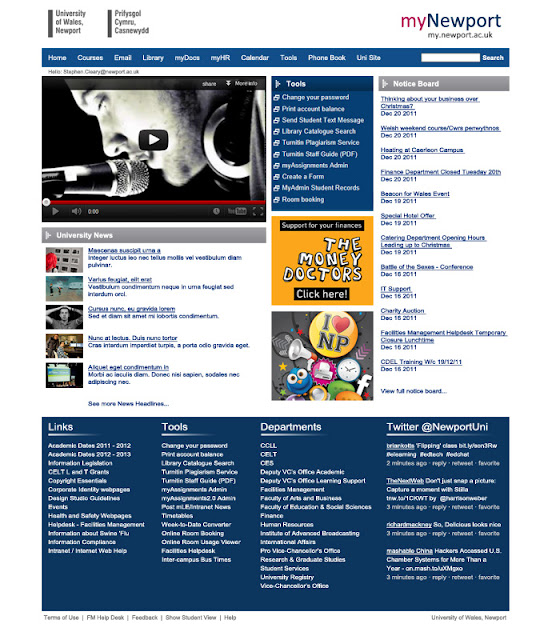
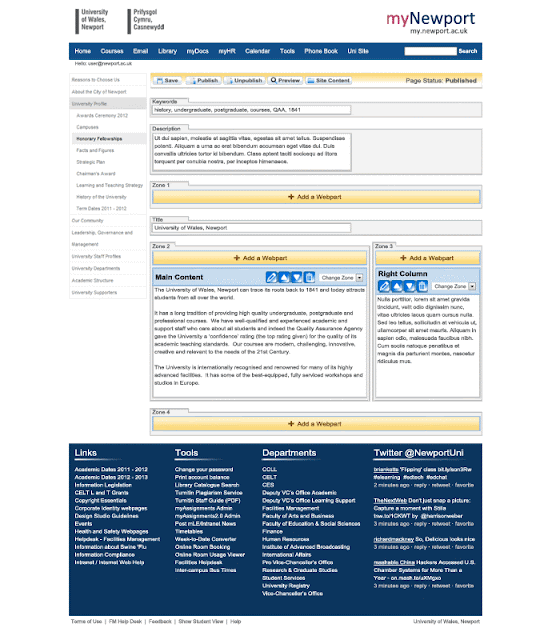
It was designed and built from scratch in house by the Web Team, specifically for this purpose. The CMS (content management system) for myNewport was created for an easy transition for existing users, and it also simplified many standard processes. Content can be tagged for staff, students, both or private, making it a very powerful and innovative system for higher education. myNewport has been designed around improving internal communications through targeted internal news, videos and improved delivery of content.
Below is an example of the myNewport homepage, and an example of what a page in the CMS will look like:
Homepage Design:
 CMS Design:
It was designed and built from scratch in house by the Web Team, specifically for this purpose. The CMS (content management system) for myNewport was created for an easy transition for existing users, and it also simplified many standard processes. Content can be tagged for staff, students, both or private, making it a very powerful and innovative system for higher education. myNewport has been designed around improving internal communications through targeted internal news, videos and improved delivery of content.
Below is an example of the myNewport homepage, and an example of what a page in the CMS will look like:
Homepage Design:


Thursday, 21 June 2012
myNewport
We have been extremely busy here at Web Team towers in Caerleon. The team has designed and developed a bespoke .NET intranet system and CMS with a staff and student view; content can be tagged as staff only, student only or both. The system has been designed around improving internal communications through targeted internal news, videos and improved delivery of content.
We are in the initial stages of testing and the system will be launched for the start of term in September.
We are in the initial stages of testing and the system will be launched for the start of term in September.
Wednesday, 18 January 2012
Newport Uni Mobile App
We are just about to launch the major update for our Newport Uni App, which includes even more useful content such as the Bus Timetable and Email. We’ve also given the design a bit of a refresh. The app is designed for use by prospective students, visitors, current students and staff, and is available on the iPhone and Android. Current students and staff can login, which then re-arranges the icons to display content such as internal news, email, timetable and print balance on the first screen.
The ’Newport Uni’ app is a must have for anyone studying at the University of Wales, Newport, or indeed anyone thinking of applying or even visiting us. Packed full of useful features for current and prospective students alike, you can browse all our available courses, find out what lecture you should be in at the touch of a button and so much more!
This smart app is exactly that ‘smart’, it will tailor the features and content to what’s right for you based on your needs as a current student or someone just thinking of applying, visiting or just checking us out.
 |
| Newport Uni app update available on iPhone and Android soon. |
This smart app is exactly that ‘smart’, it will tailor the features and content to what’s right for you based on your needs as a current student or someone just thinking of applying, visiting or just checking us out.
Monday, 16 January 2012
Video for Web: The Basics
Making a successful web video to promote your business, brand, event or service isn’t an easy task. The ‘surfing’ culture of the Internet means that if your video doesn’t appeal to the viewer within the first few seconds then they will quickly move on. Here are a few basic tips to engage your viewers and improve the quality of your video. This article is aimed at new web video producers with a fairly low budget.
Basic Tips
 When shooting on consumer equipment there are a few basic rules to keep in mind. Use a tripod whenever possible to keep the shot still, use headphones to listen to the audio you are filming, set your scene in a well lit area, watch back important scenes on location just in case you need to shoot them again, and finally edit your clips and keep them tight.
The Message
Ensure that you have a clear message for the video, and take the time to plan the video around the message. Using storyboards, scripts, shot and location lists will always improve the overall quality of the content and make it clear what you are trying to achieve.
Length
When producing digital media for web you have to think bite-size. People simply won’t sit and watch a 10 minute video unless it is REALLY interesting to them. On average my web videos are around two minutes in length, and I make sure that the message is clear from the beginning. The shorter the better!
Equipment
These days we are spoilt for choice when it comes to cameras and tech. You can film good quality shots on your digital camera, DSLR or handheld consumer camcorder. Use a tripod where possible, consumer cameras can often produce shaky shots. If you are interviewing someone, use an external microphone with your camera, it will produce a much better sound. Use headphones to listen as you are filming.
Sound
We are all used to watching Internet video and we don’t usually expect perfect picture quality. But, if the sound is inaudible, then the viewer will instantly move on. It is vital to get good clear audio when shooting interviews, speeches, presentations etc. As mentioned above, using headphones to monitor the audio as you are recording is essential. It will help you judge the background noise and if a better location is needed.
Whilst interviewing someone, make sure the interviewee is close to the camera when using an onboard microphone, or close to the mic if it’s external. It sounds obvious but many videos are inaudible because the subject is too far away from the microphone.
Editing
Editing your footage is very important to get a more professional finish to your video. Tightly edit your clips – cut out any pauses at the beginning and end of the clip. There is lots of consumer editing software out there like Windows Movie Maker or iMovie to get you started, or to really get stuck in have a look at the professional packages such as Apple’s Final Cut Pro (Mac) and Adobe Premiere Pro. Export in a high quality format like H.264 MP4 and upload to YouTube or Vimeo.
Basic Tips
The Message
Ensure that you have a clear message for the video, and take the time to plan the video around the message. Using storyboards, scripts, shot and location lists will always improve the overall quality of the content and make it clear what you are trying to achieve.
Length
When producing digital media for web you have to think bite-size. People simply won’t sit and watch a 10 minute video unless it is REALLY interesting to them. On average my web videos are around two minutes in length, and I make sure that the message is clear from the beginning. The shorter the better!
Equipment
These days we are spoilt for choice when it comes to cameras and tech. You can film good quality shots on your digital camera, DSLR or handheld consumer camcorder. Use a tripod where possible, consumer cameras can often produce shaky shots. If you are interviewing someone, use an external microphone with your camera, it will produce a much better sound. Use headphones to listen as you are filming.
Sound
We are all used to watching Internet video and we don’t usually expect perfect picture quality. But, if the sound is inaudible, then the viewer will instantly move on. It is vital to get good clear audio when shooting interviews, speeches, presentations etc. As mentioned above, using headphones to monitor the audio as you are recording is essential. It will help you judge the background noise and if a better location is needed.
Whilst interviewing someone, make sure the interviewee is close to the camera when using an onboard microphone, or close to the mic if it’s external. It sounds obvious but many videos are inaudible because the subject is too far away from the microphone.
Editing
Editing your footage is very important to get a more professional finish to your video. Tightly edit your clips – cut out any pauses at the beginning and end of the clip. There is lots of consumer editing software out there like Windows Movie Maker or iMovie to get you started, or to really get stuck in have a look at the professional packages such as Apple’s Final Cut Pro (Mac) and Adobe Premiere Pro. Export in a high quality format like H.264 MP4 and upload to YouTube or Vimeo.
Thursday, 5 January 2012
Mobile Apps - Newport Slang Translator
 In July 2011 we launched our first mobile app on Apple’s App Store and on the Android Market. We created a light hearted concept to test out developing and publishing apps. The Newport Slang Translator was born, and to our surprise it was very successful and generated local media interest.
The concept was not a traditional way to advertise a University, but it proved very popular with prospective students and the 13-17 year old age group. This subtle way of increasing brand awareness in something that was fun and relatively easy to produce worked well. We included banners at the bottom of the screen linking back to sections of our website to tie in with current marketing campaigns.
Download from Apple’s App Store (for iPhone & iPad)
Download from the Android Market
We created the Newport Slang Translator using the industry standard development tools; Xcode 4 for iPhone and iPad, and Eclipse for Android. The voice actors are members of staff and were recorded using a Shure SM58 microphone with a Roland Edirol R-09HR portable recorder. The comedy concept and script was written by Joss (Web Development Manager), Bharani (Web Developer) wrote the code and Stephen (Web Multimedia Developer) recorded the actors and edited the audio.
This was a great cross discipline project for us to venture into mobile app development. Apps aren’t just about the code; it’s about a great idea that can often be very simple. Although it’s not a typical way to advertise a University, it proved that getting creative with technology and thinking outside of the box can produce great results.
Wales Online Interview (Western Mail)
BBC Radio Wales Interview
All the best,
Stephen
Subscribe to:
Posts (Atom)